
HTML File to Code: A Programming Breakthrough – Turn AI Ideas Into Real Apps With CodeTea
In the booming era of artificial intelligence, prompting AI models (ChatGPT, Claude...) to generate a UI design (HTML file) has become incredibly easy. However, the biggest barrier for developers is how to turn those HTML files into actual source code running on Mobile or Web.
That's when the concept of HTML File to Code was born, and CodeTea is the pioneering tool that helps you analyze, convert, and output the most accurate source code for any framework.
Table of Contents
- 1. The pain of manual UI coding from HTML files
- 2. CodeTea: The perfect "HTML File to Code" solution for any AI Model
- 3. Multi-platform support (React Native, Flutter, SwiftUI...)
- 4. How to convert in 4 easy steps
- 5. Why choose CodeTea's File to Code feature?
- 6. Real-world performance comparison table
- 7. Frequently Asked Questions (FAQ)
1. The pain of manual UI coding from HTML files

Even when you have a beautiful HTML interface generated by AI, the process of converting it into a real app still faces many bottlenecks:
- Time wasting: You have to spend hours analyzing the DOM structure and re-typing every line of CSS/Flexbox code for your framework.
- Junk structure (Div-soup): AI models sometimes generate too many redundant wrapper tags, making the HTML file heavy and hard to reuse in components.
- Inconsistency: Each framework (Flutter, React Native) has a different way of representing UI. Static HTML files cannot run directly on these mobile platforms.
2. CodeTea: The perfect "HTML File to Code" solution for any AI Model
With its core feature being HTML File to Code, CodeTea is the perfect bridge between AI and Development:
- Flexible from any source: Whether your HTML file comes from ChatGPT, Claude, or Gemini, CodeTea can import and understand the structure accurately.
- Automatic tag optimization (Tree Shaking): CodeTea automatically removes junk HTML tags, optimizes CSS properties, and translates them into a standard Flexbox system.
3. Multi-platform support: From Mobile to Web
The true power of CodeTea lies in its versatile compiler, helping you output source code for any ecosystem:
- File to React Native: Convert HTML into standard React Native components, ready for cross-platform use.
- File to Flutter: Easily export Dart Widgets, optimizing for smooth and beautiful interfaces.
- File to SwiftUI: A powerful assistant for iOS Devs, quickly converting to Apple's declarative syntax.
- File to Android XML & File to Compose: Fully solve the UI problem for Android, whether you maintain legacy projects (XML) or new technologies (Jetpack Compose).
- File to HTML & File to Web: Re-standardize the AI HTML file into standard Semantic, Responsive source code to build high-quality Front-end Web.
4. How to convert in 4 easy steps
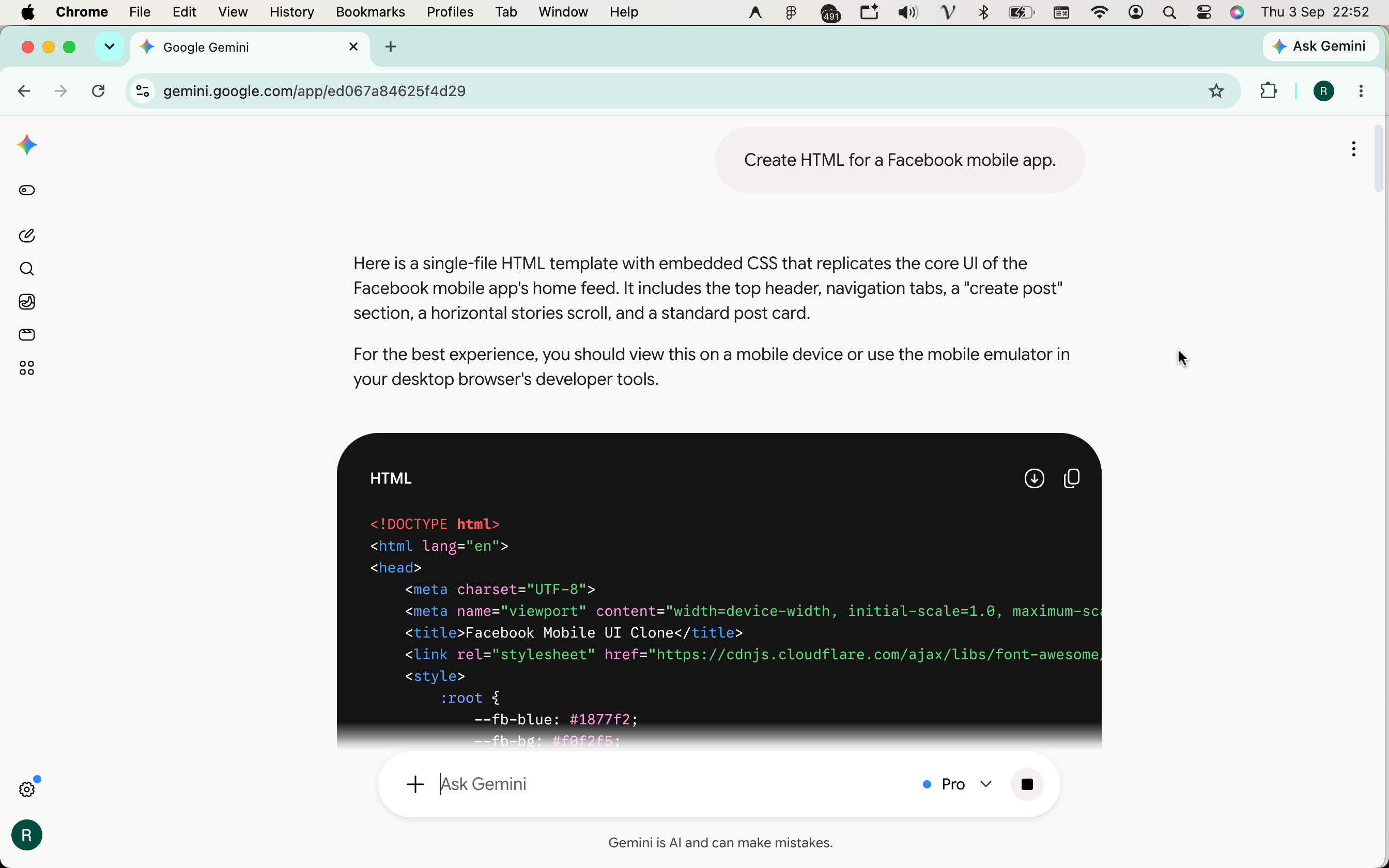
Step 1: Enter a prompt requesting AI Models (ChatGPT, Claude, Gemini...) to generate the HTML UI code you need.
- Step 1: AI Prompt & Save File: Instruct AI (ChatGPT, Claude...) to write HTML code according to your needs and save it.
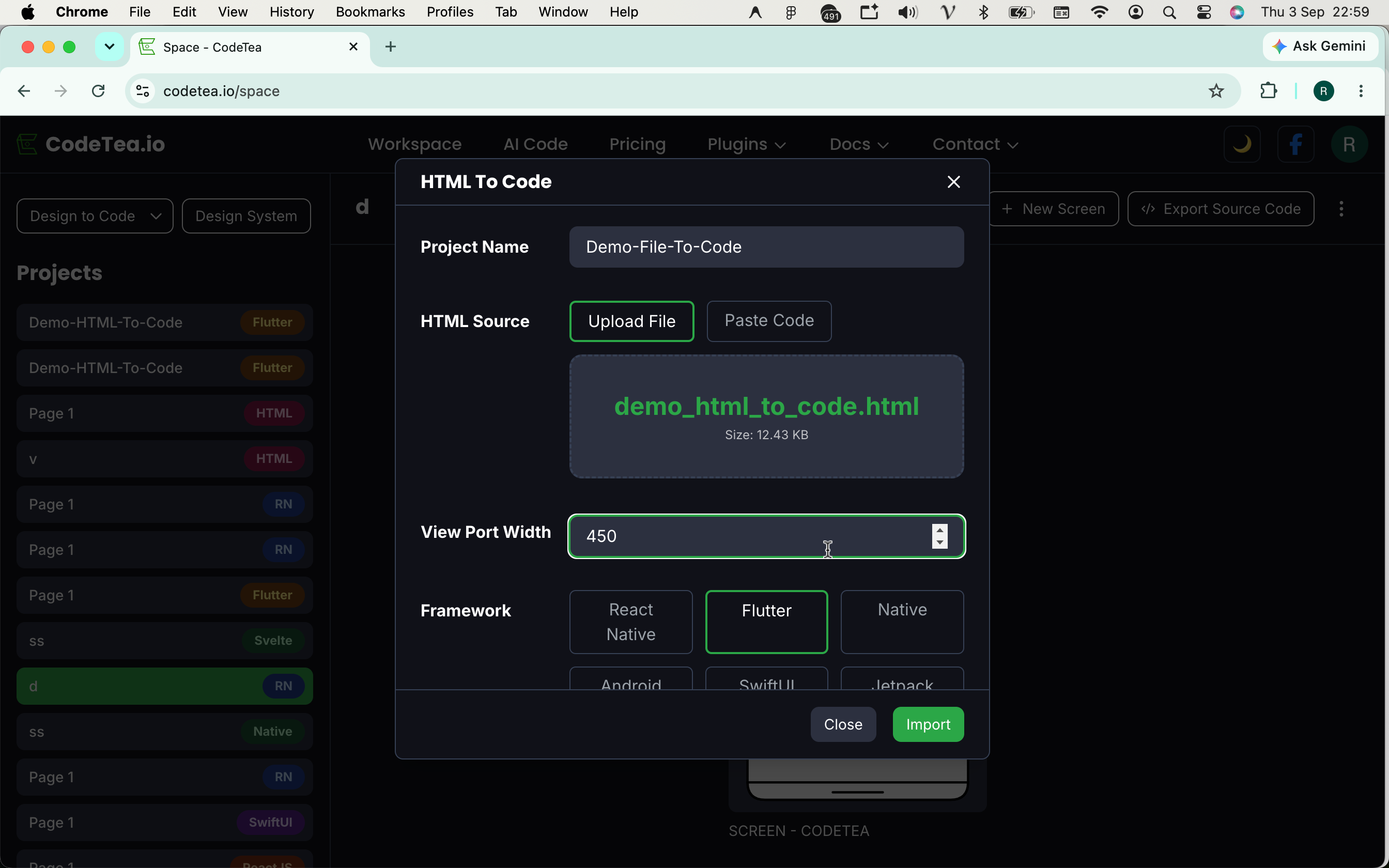
- Step 2: Import Configuration: Enter project name, upload the HTML file, enter Viewport Width, choose the framework and press Import.
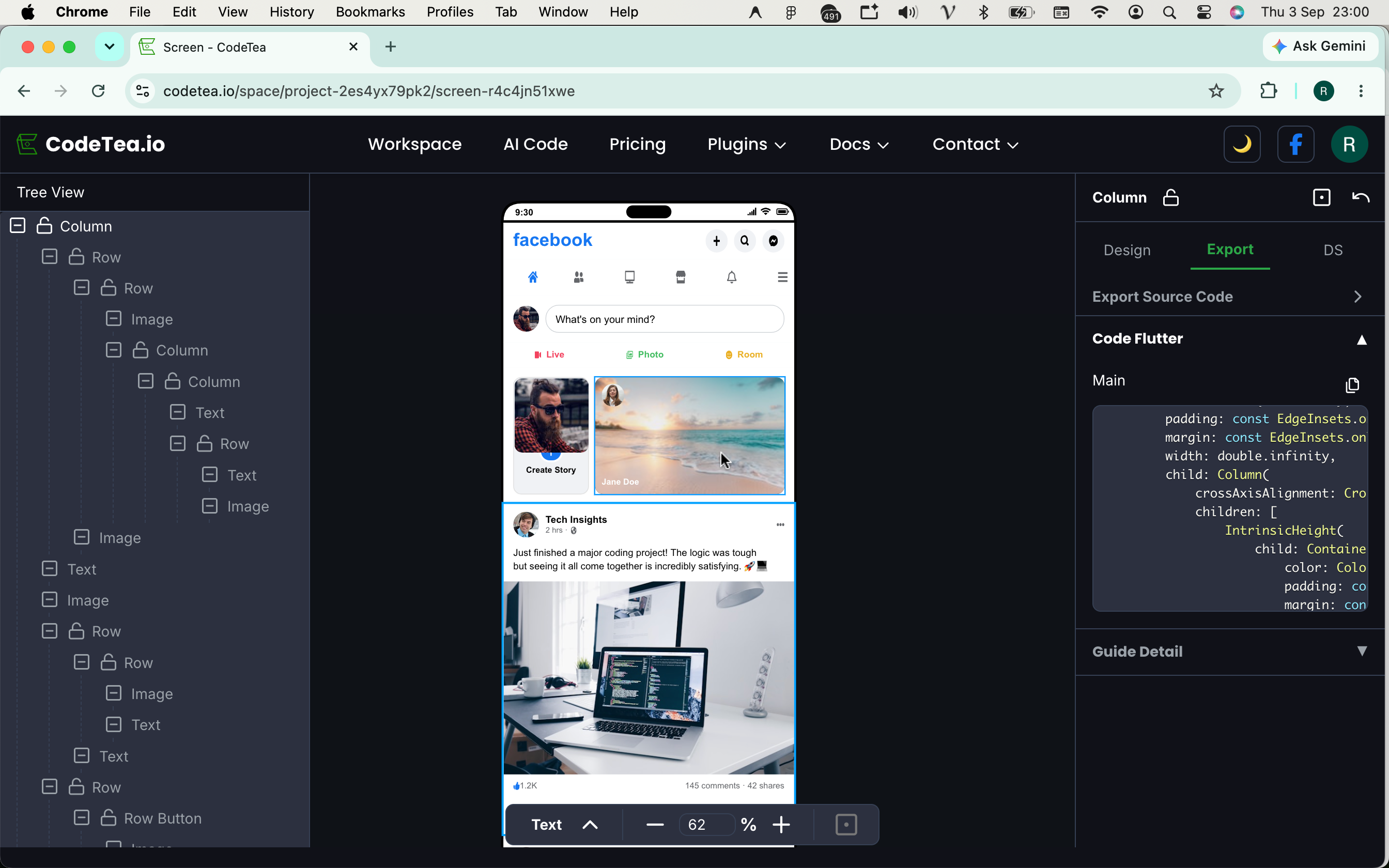
- Step 3: View Detailed Code: CodeTea compiles automatically. You can click on each small component to see the corresponding code snippet.
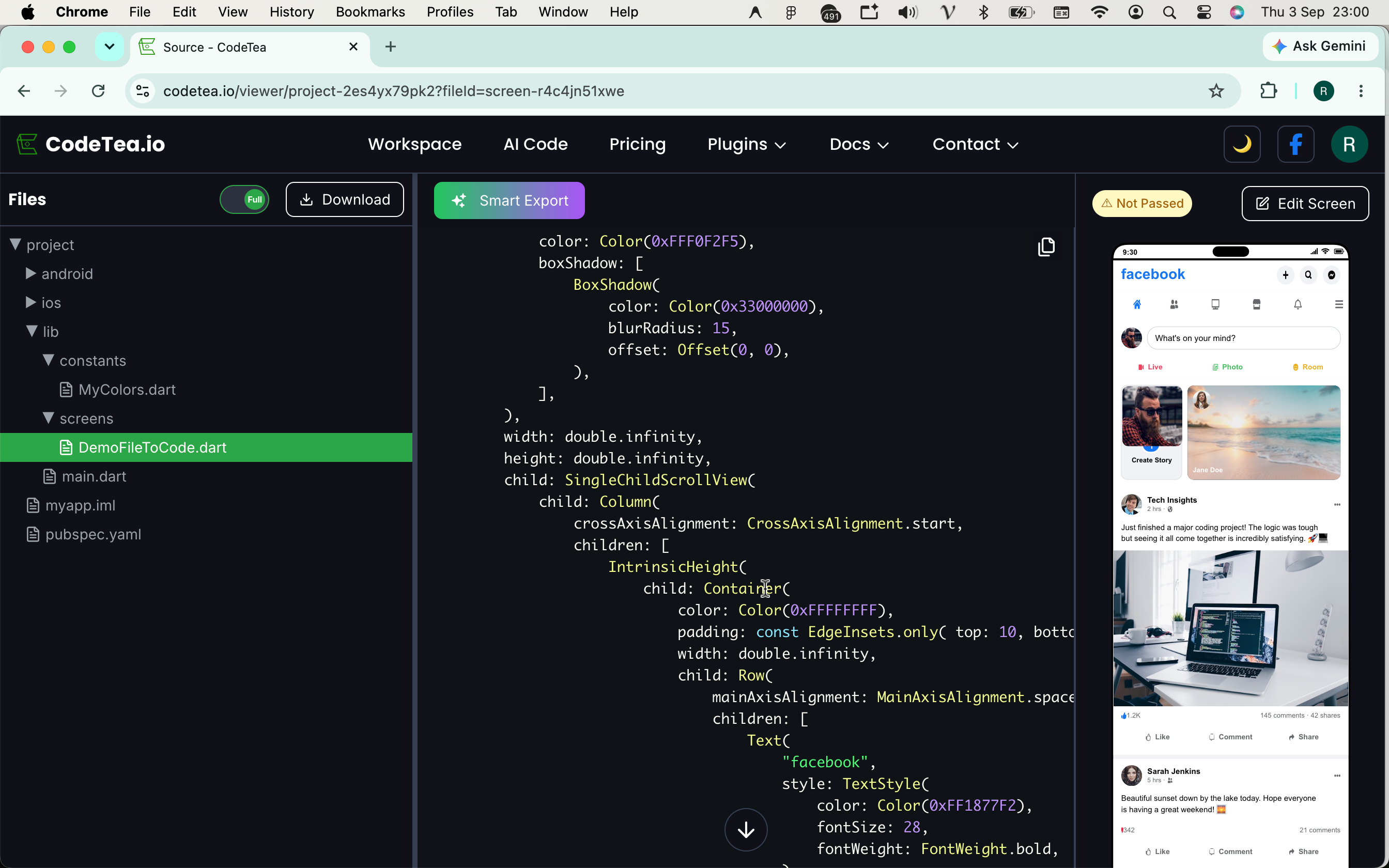
- Step 4: Export Entire Project: Press Export to download the fully completed source code of the entire project.
// Example of File to React Native result from CodeTea
import React from 'react';
import { View, Text, TouchableOpacity, StyleSheet } from 'react-native';

export const AIPromptedScreen = () => {
    return (
        <View style={styles.container}>
            <Text style={styles.title}>AI Model Generated UI</Text>
            <TouchableOpacity style={styles.button}>
                <Text style={styles.buttonText}>Explore Now</Text>
            </TouchableOpacity>
        </View>
    );
};

const styles = StyleSheet.create({
    container: { flex: 1, padding: 16, backgroundColor: '#FFF' },
    title: { fontSize: 24, fontWeight: 'bold', marginBottom: 20 },
    button: { backgroundColor: '#007AFF', padding: 12, borderRadius: 8 },
    buttonText: { color: '#FFF', textAlign: 'center', fontWeight: '600' }
});
5. Why choose CodeTea's File to Code feature?
Instead of using drag-and-drop tools that generate "junk code", CodeTea acts like a real programmer (10x Developer). The system always ensures the exported code uses standard Flexbox, maintains Responsiveness across devices, and is fully compatible with familiar CLIs like Expo, React Native CLI, or Flutter SDK.
6. Real-world performance comparison table
| Criteria | Manual Code from HTML | CodeTea (File to Code) |
|---|---|---|
| Speed | Takes hours | Just a few seconds / 1 click |
| Platform compatibility | Must setup and rewrite from scratch for each app | Export directly to multi-frameworks (Web/App) |
| Code Quality | Depends on Dev's skill | Clean, standardized Componentization |
7. Frequently Asked Questions (FAQ)
Which frameworks does CodeTea support when converting HTML File to Code?
Our system supports exporting file to react native, file to flutter, file to swiftui, file to android xml, file to compose, file to html and file to web.
Can I use any AI to generate the HTML file?
Absolutely. As long as your AI tool (ChatGPT, Claude...) can export an HTML file with clear UI/CSS structure, CodeTea can process it smoothly.
Is the exported source code clean and easy to maintain?
Yes. CodeTea automatically analyzes and applies Tree Shaking algorithms, removing junk tags and intelligently merging classes to help the code be well-structured and easily reusable.
8. Conclusion
The combination of AI Prompts and HTML File to Code is the key to 10x software development productivity. Don't let manual UI rewriting slow down your project's progress!
Ready to breakthrough your development speed?
Stop wasting time on manual slicing. Start turning any HTML design file into an app masterpiece today.